
Interpretation
Whether online, by phone, or in the room, bring language access to every meeting.
Live caption translation and natural-voice audio interpretation across 130+ languages, built directly into the meeting system you already use.
Listen in your language
- EnglishListen in your language
- EspañolEscuche en su idiomaLive
- 中文用您的语言收听
- Tiếng ViệtNghe bằng ngôn ngữ của bạn
- 한국어당신의 언어로 들으세요
- FilipinoMakinig sa iyong wika
The problem
Residents and leadership expect more language access
Human interpretation for every meeting is expensive and impractical, and it’s not ideal for the clerk to manage yet another layer of technology.
28%
Most residents won’t ask for an interpreter
In our 2024 National State of Community Engagement survey, 28% of Spanish-speaking residents said they’re uncomfortable requesting an interpreter. 71% are comfortable using a translation option that’s already available.
Interpreter budgets cover one language during a meeting
Coverage typically pays for one meeting at a time. The Spanish interpreter is booked for the council meeting, leaving the planning commission, the boards and commissions, and the special meeting called on Tuesday uncovered. Those are where many of the city’s biggest land-use and budget decisions are debated.
Another system to maintain
AI tools can solve the problem, but implementing and maintaining them creates another responsibility for some of the busiest people in local government.
HOW IT WORKS
More ways for residents to listen in
If your meetings already run on PublicInput, the audio is already flowing in for captions. Interpretation rides the same feed, so there’s no separate audio setup.
Connect your meeting audio
Pull from in-room mics, your existing stream, a phone bridge, or a combination. If an AV encoder is part of your setup, we coordinate with your vendor on the handoff before you sign.
Live language interpretation
The meeting audio gets translated in real time and read back in a natural voice, a few seconds behind the speaker. Captions work the same way, using the same meeting audio.
Follow the meeting your way
Listen by phone, follow along online, or read live captions in the room.
Dial in and press on the number to listen to the meeting in your language of choice.
A resident dials the meeting’s number, presses a digit for their language, and hears the meeting. It works on any phone, including a landline.
Built Into Meetings on Your Agenda
Plug Into Your Existing Tools
If you’re already hosting meetings with us, this turns on inside the same setup. No new vendor, login, or hardware is required.
Voice-Matched Audio
Audio is built on Azure Cognitive Voice, preserving the speaker’s gender and tone, so their voice doesn’t get lost.
One Flat Annual Number
We use your actual meeting schedule to set the scope and give you one annual price per board, covering every language you need. If meetings run over or you need an emergency session, you’re still covered.
Integrated Into Your Boardroom
Join the meeting through your existing public meeting page. In-room captions match your branding as well, making it easy for everyone to follow along.
What’s Included In
Interpretation
Give residents the meeting page in their own language
- Switch the same public meeting page to any language you select.
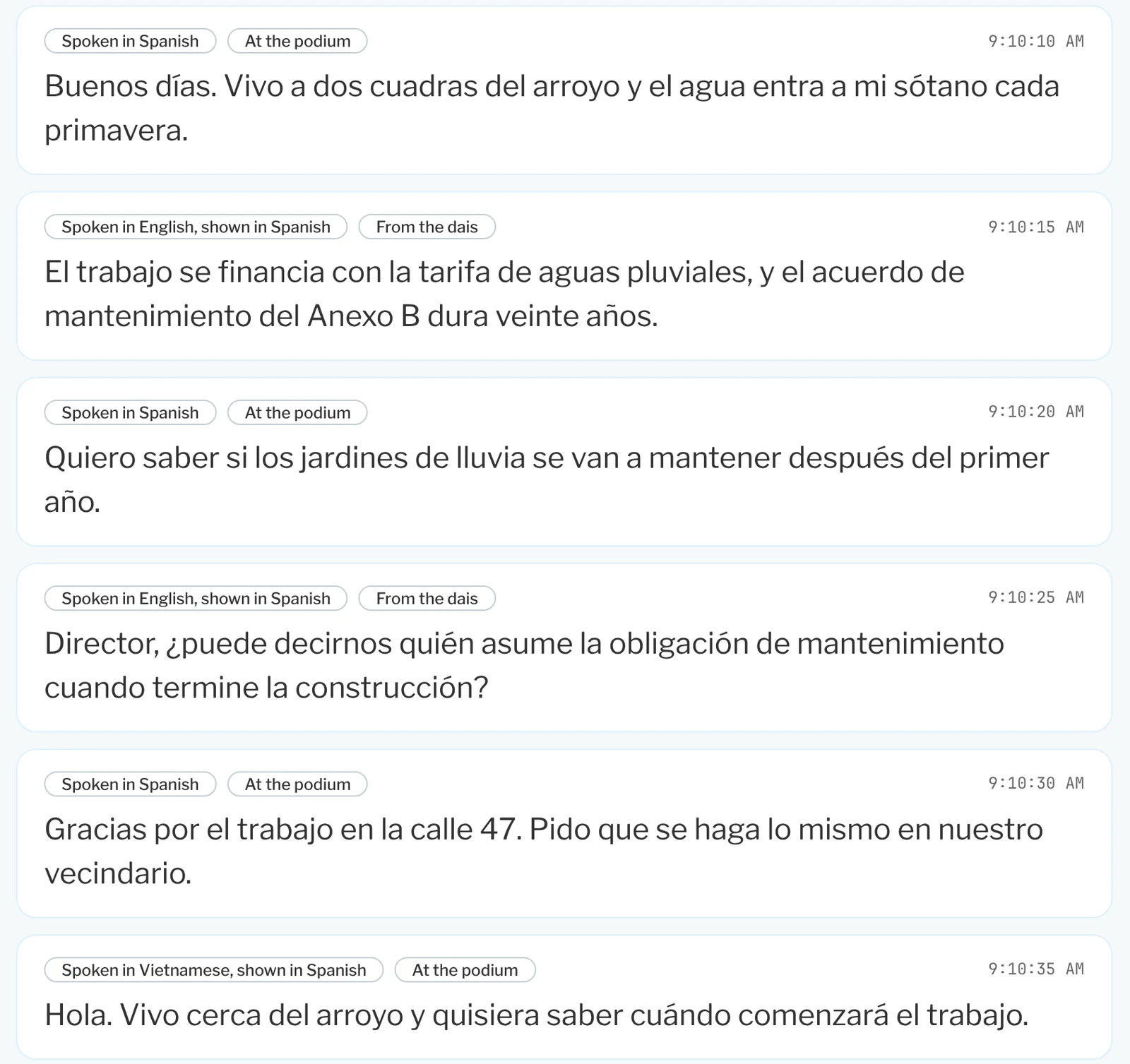
- Scroll live captions alongside the interpreted audio.
- Label each caption block with who spoke and the language they used.
Offer the same languages online and by phone
- List every language you turn on, on both the meeting page and the dial-in menu.
- Natural-sounding translated audio preserves the speaker’s gender and tone, helping the speaker’s voice carry through the interpretation.
- Let residents switch between web and phone without learning a new system.
Show translated captions on a screen in the room
- Put live captions on a display or projector in the chamber or lobby.
- Add a QR code that hands the meeting off to residents’ own phones.
- Match the display to your seal and colors.
Let staff or your interpreter read comments into the room
- Show the English translation of a comment on a phone or laptop.
- Follow registered speakers who aren’t speaking English, in speaking order.
- Switch to listening for English and the speaker’s language when their turn begins.
How this is packaged
We don’t sell hours.
Most AI interpretation is sold as a bank of hours you buy upfront. We price per board, flat, for the year. Here is the difference in practice.
How we’d size it for a city your size. Council, 24 meetings at 4 hours. Planning commission, 20 at 2 hours. About 136 hours a year, built from your published calendar. We use it to size the price, and you are never billed against it.
Hour-bank pricing
- What you buyA block of hours, picked before the year starts
- When you use them upYou buy more, mid-year, at mid-year prices
- The mid-year call“You’re out of hours.”
PublicInput
- What you buyOne flat annual rate per board
- When you use them upNothing to use up
- The mid-year callNothing changes
Live Meeting Interpretation runs on Microsoft Azure, keeping your data in the U.S.
The PublicInput Meetings suite
Explore the rest of PublicInput Meetings
Each product works on its own or together, so you can start with what you need and add more when you’re ready.
Questions clerks ask about interpretation
Does this replace our interpreters?
No. It lets you spend your interpreter budget where it does the most good: legal proceedings, high-stakes hearings, and ASL, which this product does not touch at all. Some agencies move routine meetings off human interpretation. Others keep every interpreter they have and add the languages they are unable to staff.
How accurate is it, really?
The engine underneath is Azure AI Speech. Microsoft Research reached “human parity” on the standard conversational speech benchmark: the AI got 5.8% of words wrong, and professional human transcribers got 5.9% wrong on the same test. Captions and the recording make errors visible, so a mistake can be caught and corrected.
Could we just use YouTube auto-translate or Zoom captions?
For a stream, sometimes. For a public meeting there are gaps. YouTube does not auto-translate captions on a live broadcast, and none of these tools ring a phone, offer a keypad language menu, show on a display in your chamber or add captions to your meeting record.
Does this satisfy our language access obligations?
That is what this is built for. Most requirements come down to real-time access to the meeting in the languages your community speaks, and translated access to the material around it. We cover both, and you get a record of what was provided at each meeting.
Where does the audio go, and is anything stored?
Translation and voice run on Azure Cognitive Services inside our Azure environment, exclusively on U.S. servers. AI models are not trained on your data, and you retain full ownership and control of your data.
Hear it for yourself
Dial in during your demo and hear the meeting in another language.
Call from any phone, pick a language and listen live.