Skip to content
PublicInput
  • How We Help
    • How We HelpTools for every step of public engagement, from first outreach to final report.

      How we help overview
      Create Projects & SurveysLaunch project pages and mobile-friendly surveys Engage Online & OfflineReach residents by web, text, phone and in person Run Accessible MeetingsCaptioned, multilingual public meetings Turn Feedback Into InsightGroup, summarize and report on public comment Track Every VoiceSee who you’re reaching and who you’re missing
      Customer story

      “PublicInput makes it so easy for me to do so much in so little time.”

      Brenda Thomas, Communications & Planning Services Manager, Fresno COG

      Read customer stories
  • Who We Serve
    • Who We ServeBuilt for the public agencies that plan, build and govern our communities.

      Who we serve overview
      Local GovernmentCities, counties and towns Transit AgenciesService changes, routes and rider input DOTs & MPOsStatewide and regional transportation planning Councils of GovernmentRegional planning across member jurisdictions
      Customer story

      “PublicInput gives you the Ferrari of engagement technology.”

      Justin Schneider, Engagement Specialist, City of Austin

      Read customer stories
  • Solutions
    • AgendasKeep agendas and meeting packets organized and on schedule Live MeetingsSpeaker sign-up online, at a kiosk or on Zoom, with a managed queue Boards and CommissionsRun board meetings in the same system as council Action MinutesMotions, votes and public comment drafted from the recording Live VotingTablet voting, with results added to the minutes automatically InterpretationLive captions and audio interpretation in 130+ languages Broadcasting & Video ArchiveStream anywhere; recordings chaptered, captioned and searchable Meetings Solutions overviewRun accessible public meetings from agenda to archive.
      Customer story

      “We’ve cut meeting prep and post-processing time by 26%.”

      Andrew Potter, Executive Officer/Clerk, San Diego County Board of Supervisors

      Read customer stories
      Community Engagement PlatformOne hub for surveys, comments, documents and meetings, reaching residents online and offline.
      Online engagement hubs
      Text & email blasts
      AI comment analysis
      Equity mapping
      Live polling & Q&A
      Agency dashboard
      Customer story

      “Love the ability to engage the public and the tools to see who is participating.”

      Jennifer Cinelli, Transportation Planner, Delaware DOT

      Read customer stories
  • Resources
    • ResourcesGuidance, research and stories from agencies doing engagement well.

      All resources
      BlogsIdeas and best practices for engagement WebinarsLive and on-demand sessions Customer StoriesHow agencies use PublicInput ReportsResearch and industry reports SubscribeGet the PublicInput newsletter
      Customer story

      “Easy to use system for creating interactive and engaging project pages.”

      Monica Haines Benkhedda, Baltimore Metropolitan Council

      Read customer stories
  • Plans
  • Login
  • Book A Demo

Multi-Channel Engagement

Participation doesn’t happen in just one place.

Residents share feedback in different ways, from text and phone to email, paper, and online surveys. Bring every response back to the same project, ready for your team to review.
Book a demoExplore Plans
Text-to-survey
A resident texts the keyword on the posted sign or the mailed notice and gets the questions one at a time.
Calls and email
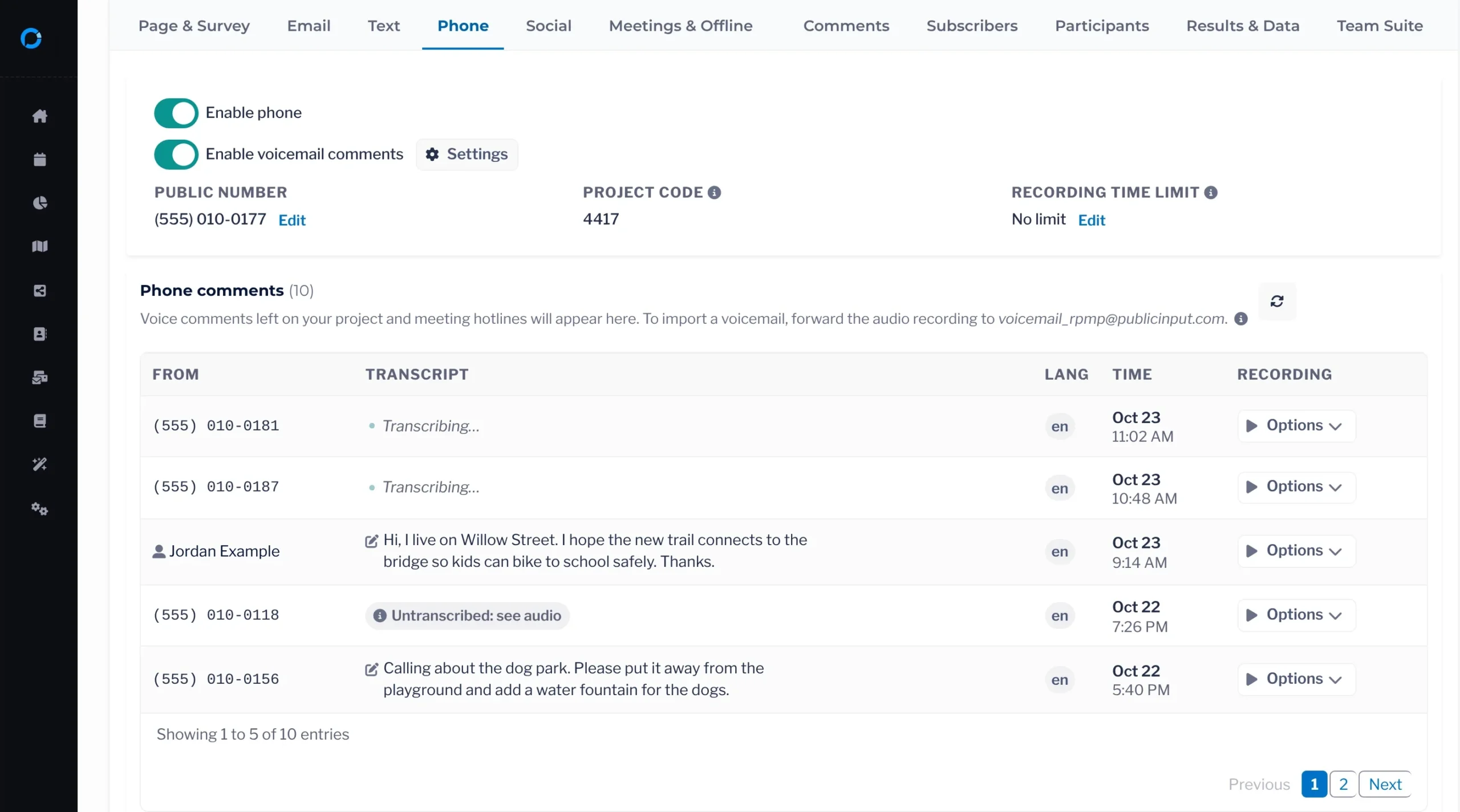
Turn on the phone tab and the project has a voicemail line.
Open house
At the open house, residents sign in on a tablet or kiosk.
Languages
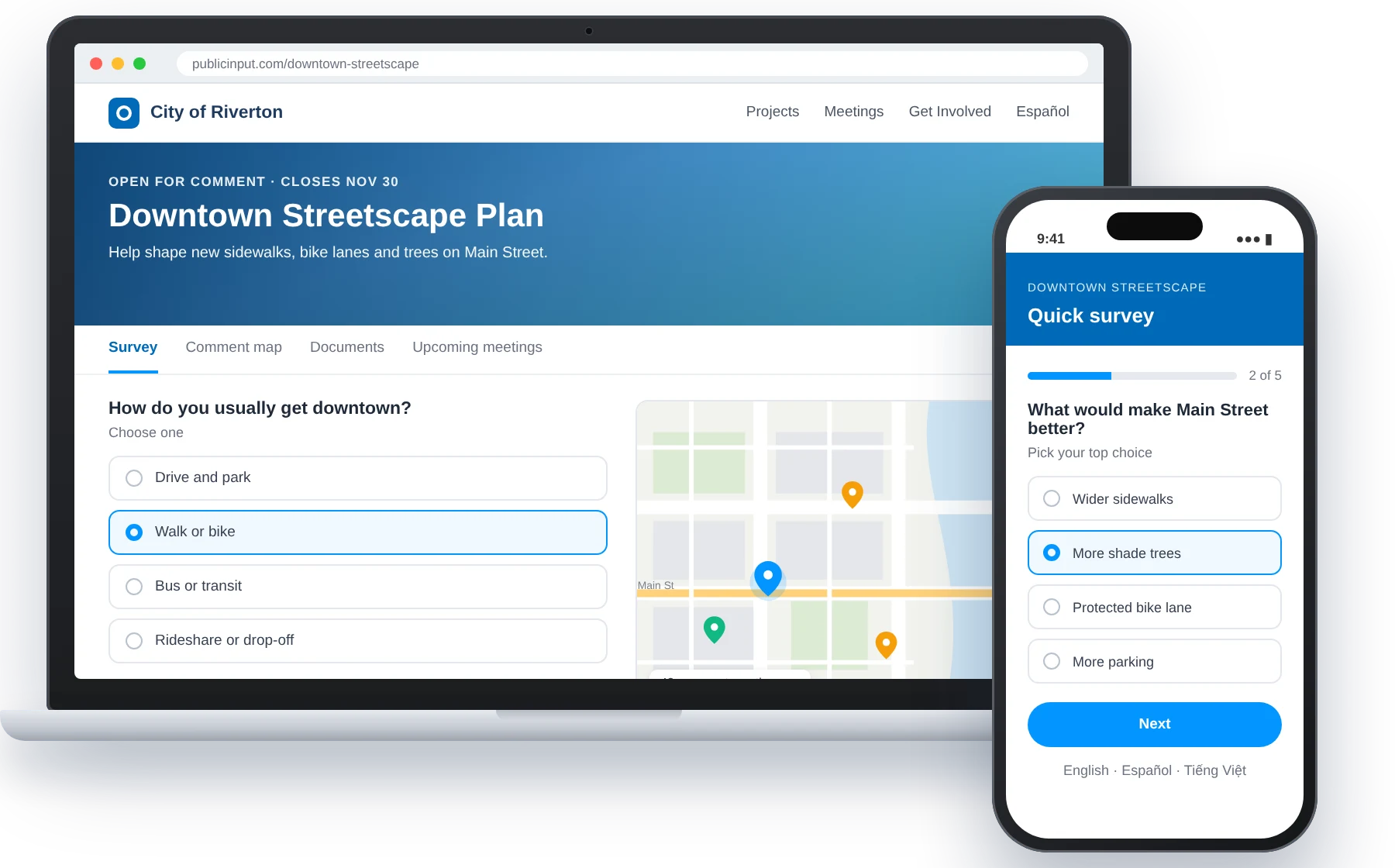
Every project page and the hub have a Translate button.
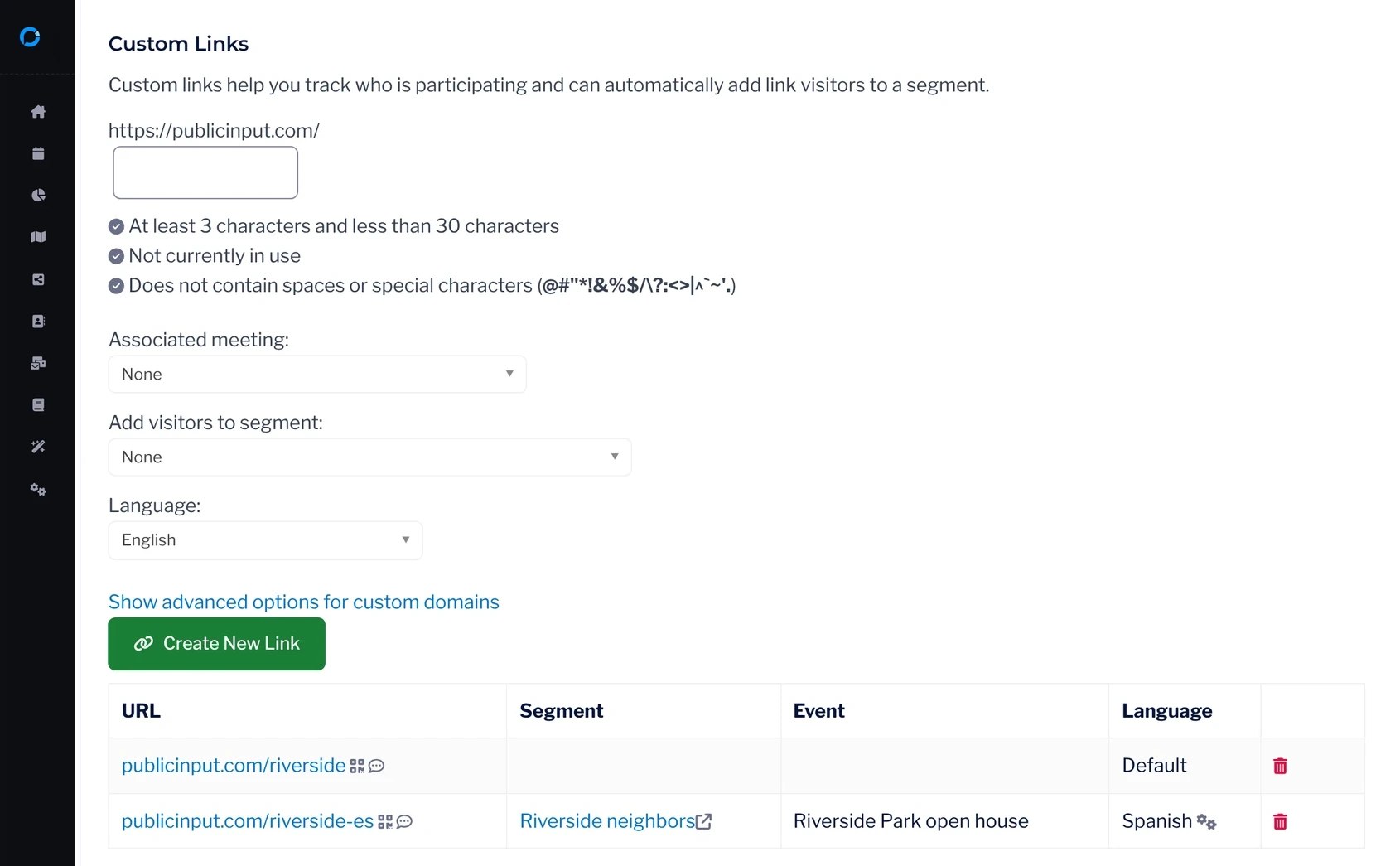
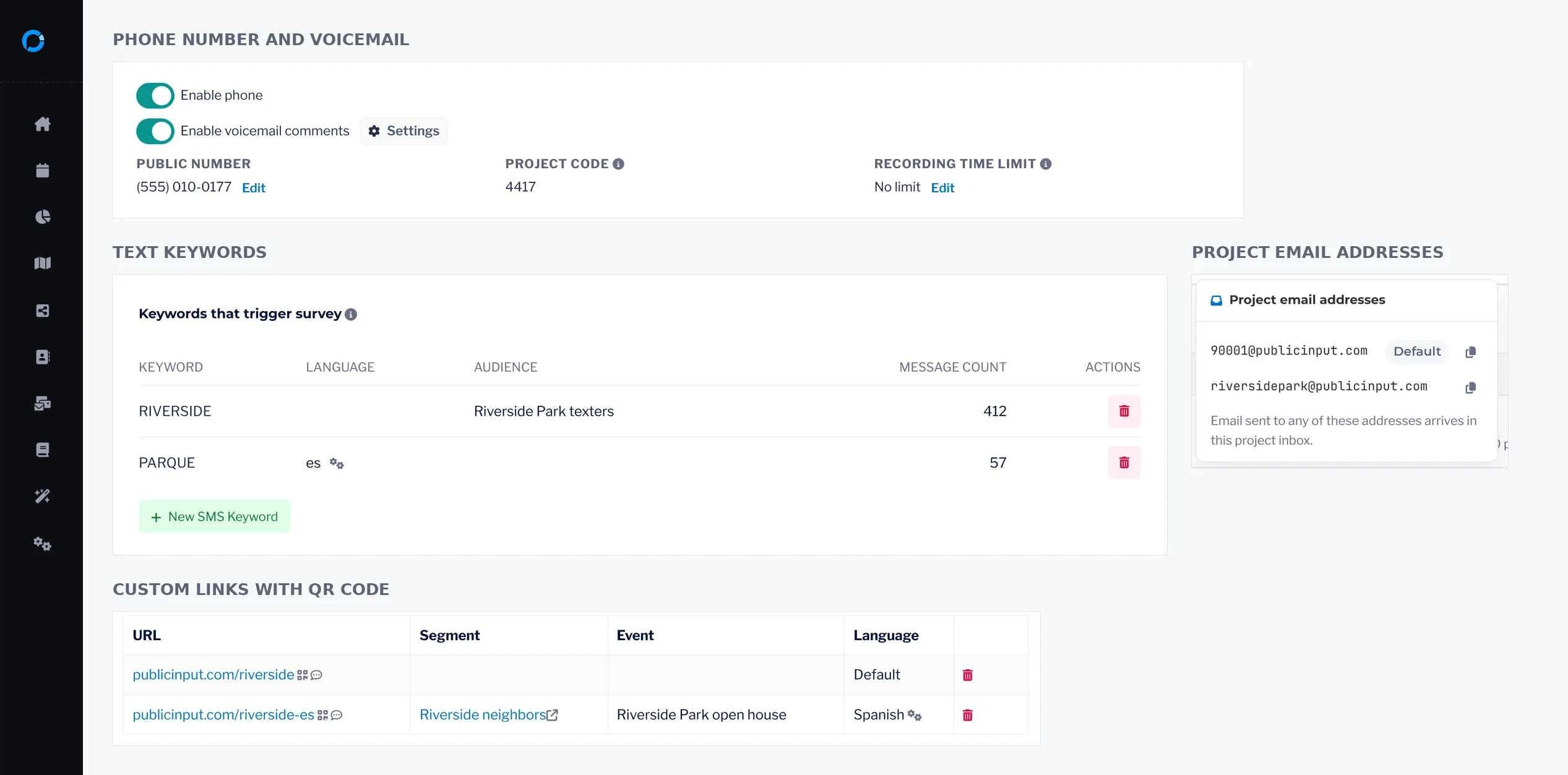
Four settings panels from one project: the phone number (555) 010-0177 with project code 4417 and voicemail comments on, text keywords RIVERSIDE and PARQUE with message counts, the project email addresses 90001@publicinput.com and riversidepark@publicinput.com, and custom links publicinput.com/riverside with a QR code and a Spanish version tied to a segment and an event

Overview

Every Answer Lands on One Project Record

Every text, voicemail, email and online comment lands on one project record, tied to the resident who sent it. When leadership asks how many people weighed in, you have the full count without rebuilding a spreadsheet.

  • Let residents answer by text from a keyword on a posted sign or mailed notice
  • Save transcribed voicemails and project emails as comments on the project
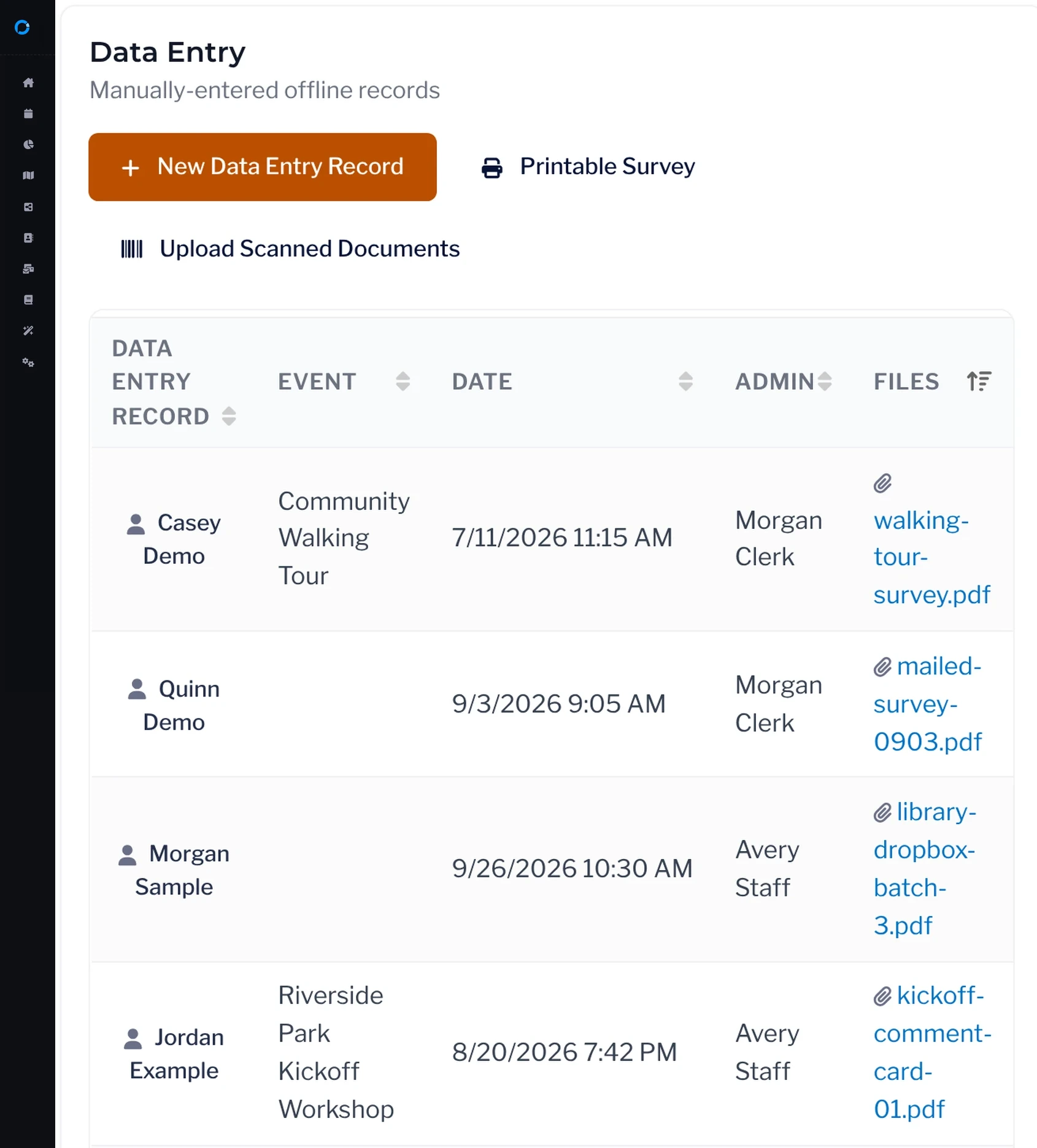
  • Enter paper surveys and open house sign-ins so they count with online responses
  • Offer every project page in other languages with a built-in Translate button
“
Setting up a project page and getting all of the QR code, the text, and the phone number set up takes me about five minutes.
CCCharleston County

What’s Included In

Multi-Channel Engagement

Text and Phone

Every project gets a text keyword, a voicemail line and its own email address.

  • Message counts by keyword, so you know which flyer worked
  • A keyword per audience or language, like PARQUE for the Spanish survey
  • Voicemails are transcribed and emails become comments on the project
Mobile Canvassing

Take the survey door to door on a phone.

  • Staff and volunteers collect answers in the field, and they land on the project
  • Enter paper surveys and mailed letters so they count with online responses
  • VIA Metropolitan Transit’s canvassers reached more than 14,000 residents across two lines. Read the VIA story
Embedded Surveys

Put the survey on any website.

  • Embed it on your own site, the library’s or a partner’s page
  • Answers still land on your project, with everything else
  • A QR code and short link for every project, plus custom links by language
Meetings and Campaigns

Reach residents through the rest of PublicInput.

  • Residents without broadband join the meeting speaker list by phone with PublicInput Meetings. See Live Meetings
  • Send the survey link by email and text with PublicInput Communications. See Communications
Multi-Channel EngagementMulti-Channel EngagementMulti-Channel EngagementMulti-Channel EngagementSearch
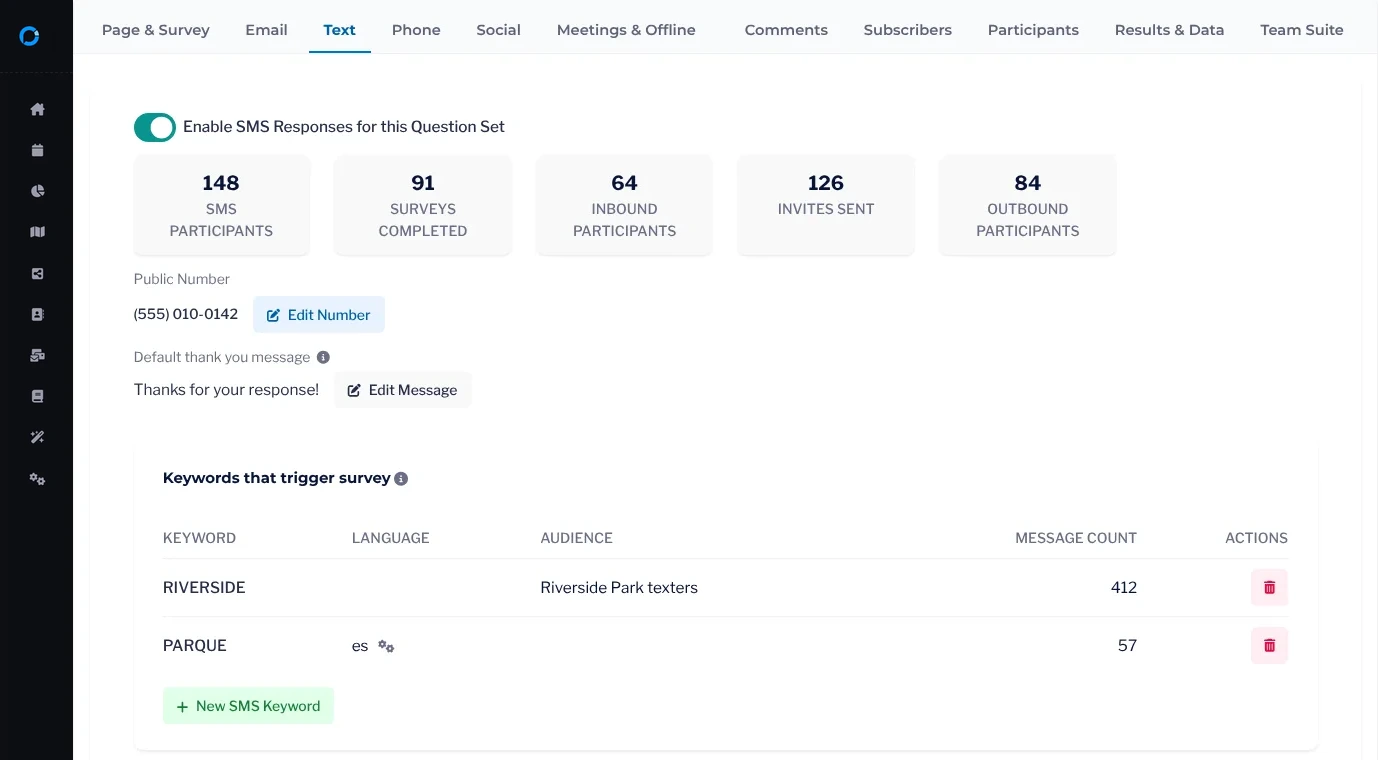
Text tab for a project with SMS participant counts, the project phone number and keywords that trigger the survey, RIVERSIDE in English and PARQUE in Spanish, with message counts for each Data Entry screen for manually entered offline records, with a New Data Entry Record button, Printable Survey, Upload Scanned Documents and records from a community walking tour and a kickoff workshop Custom Links settings for a project, with an associated meeting, segment and language, and links for the default and Spanish versions Phone tab for a project with phone and voicemail comments turned on, the public number and project code, and a list of transcribed voicemails
A Downtown Streetscape Plan project page on a laptop with a survey question and comment map, next to the same survey on a phone with language options

From the field

Five minutes to set up every channel

North Central Texas Council of Governments uses phone and offline tools so residents can take part with or without internet.

Read the Charleston County storyRead the NCTCOG story

The PublicInput Engagement suite

Explore the rest of PublicInput Engagement

Use one, or use them together. Every comment lands on the same resident record.

Comment ManagementTag, route and answer every comment.Learn moreOnline Engagement HubGive residents one page for every project.Learn moreProject Sites and SurveysBuild a project page with a survey on it.Learn moreYou’re hereMulti-channel EngagementHear from people who skip the hearing.This pageAI Analysis and ReportingSee what a thousand comments say.Learn moreEquity MappingSee who you’re missing while there’s time.Learn moreStakeholder ManagementKeep one stakeholder list across projects.Learn more

Questions about channels

Do we need IT to turn on text and phone?

No. Anyone who manages the project can switch on text, phone and email from the project settings.

Can people who answer by text sign up for updates?

Yes. The last text question can ask, and a reply of 1 adds them to the project’s list.

What about comment letters that come in the mail?

Log each one on the project in about a minute. It sits on the record right next to the online comments.

How does a voicemail end up on the right project?

Every project line has its own project code, so the message goes straight there.

Bring your next open house

See your next project’s comments land in one place

Book a demo Explore Plans
×

Watch a Project Go From the First Comment to the Council Packet.

PublicInput
  • How We Help
    • Who We Serve
    • Engagement Solutions
    • Meetings Solutions
    • Engagement Plans
    • Meetings Plans
  • Resources
    • Blogs
    • Webinars
    • Reports
    • Customer Stories
    • Subscribe
  • Support
    • Knowledge Base
    • Contact Us
    • Book a Demo
    • Login
  • Company
    • Our Story
    • Partners
    • Careers

© 2026 PublicInput. All rights reserved.
Privacy Policy | Terms of Service | Resident Terms of Service
FacebookLinkedInYouTube