Accessible By Design: How PublicInput Supports ADA Compliance

Public engagement only works when everyone can actually participate. Here's how PublicInput is making that easier - across your content, your meetings, and your platform.
Our Commitment to Accessibility
At PublicInput, accessibility isn’t a feature we added – it’s a standard we build to. Our platform is evaluated against WCAG 2.1 AA and actively targeted toward WCAG 2.2 AA, the current benchmark for accessible digital experiences. To ensure we’re holding ourselves to that bar, we publish a VPAT (Voluntary Product Accessibility Template) updated in 2026 which can be requested at any time. Internally, accessibility is part of every sprint — from design through development through release — and we conduct audits both with external reviewers and our in-house QA process, using automated tools like WAVE and JAWS.
That means when you build a project page, launch a public meeting, or send an email campaign in PublicInput, you’re working on a foundation that’s been tested, reviewed, and continuously improved with accessibility in mind.
A Closer Look: What PublicInput Does for Accessibility
The Engagement Platform
Built-in accessibility – no setup required
The PublicInput platform is built with standard accessibility practices baked into every component. All interactive elements — menus, forms, and maps — are operable by keyboard alone. Pages use proper ARIA roles, labels, and landmarks, and have been tested with screen reader software. Every page includes a skip-to-content link, visible focus indicators, and structured page titles. Forms display errors as text notifications readable by screen readers, and tooltips are dismissable, hoverable, and persistent so they don’t disappear before a user can act on them.
On the visual side, native components meet WCAG color contrast minimums , and the platform is fully responsive. There is no auto-playing audio, no flashing content, and no keyboard traps that interfere with accessibility.
Helping your team create accessible content
Beyond the platform itself, PublicInput gives authors the tools to keep their content accessible. Every image upload includes an alt text field. The authoring interface includes contrast validation tools. Survey questions, map tools, and comment forms all include clear labels and error identification. And all platform templates are audited for accessibility before they reach your team.
NEW: Built-in Accessibility Checker
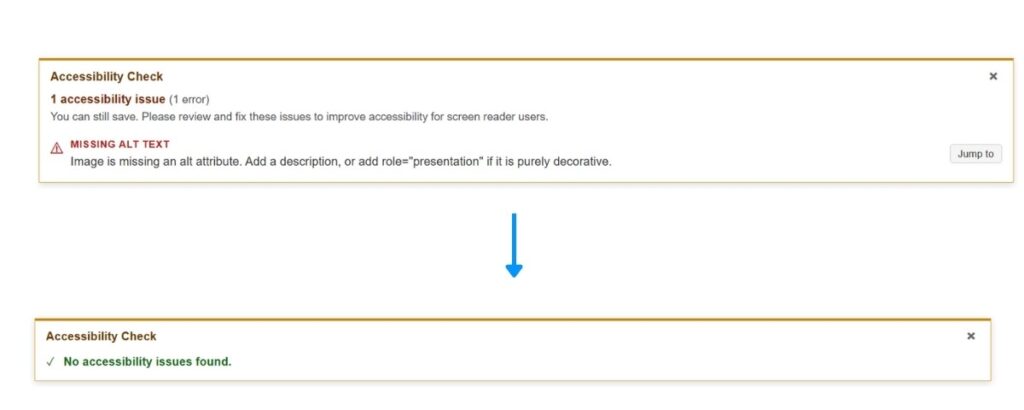
PublicInput now includes a built-in accessibility checker directly inside the rich text editor — the same editor used to author project pages, portal content, and email communications. It’s available to all customer admins, right in the toolbar, with no additional tools or plugins required.
With a single click, the tool scans your content, highlights problem areas directly in the editor, and explains what needs to be fixed and why. Common issues it surfaces include:
- Missing alt text — Images without descriptions are invisible to screen readers
- Low color contrast — Text that doesn’t meet WCAG 4.5:1 is hard to read for many users
- Vague link text — “Click here” provides no context for assistive technology users
- Broken heading structure — Empty or decorative headings disrupt page navigation for screen readers
Once you’ve made fixes, run the scan again. When no issues remain, you’ll see a confirmation – a small but meaningful signal that your content is ready for everyone.
The checker is available across project pages, portal and hub builder content, and email templates.
Multilingual and language access
PublicInput supports built-in page translation across 103 languages, with custom language links for portals and the ability to make manual edits to fine-tune machine translations.
Content and media
YouTube-embedded video players support captions, and recorded events are transcribed. Interactive maps include a text-input fallback (open-ended comment box) for keyboard and assistive technology users. Public pages also support the Sienna Accessibility Widget, a one-click tool that lets residents adjust font size, contrast, reading guides, text spacing, and cursor size.
Public Meetings, Built for Everyone
Accessibility doesn’t stop when a project page goes live. For many residents, the public meeting is the most direct point of contact with their government – and PublicInput’s meetings platform is designed so that participation isn’t gated by how someone connects.
Multiple ways to participate
Not everyone can join a public meeting through a web browser – and PublicInput’s meetings platform is built with that in mind. Residents can participate by phone dial-in (an alternative that benefits users with vision, mobility, or cognitive disabilities), SMS, email, or voicemail, depending on your plan. Registered speakers calling in are automatically recognized, reducing friction at the point of participation.
Live meeting accessibility
When connected to the PublicInput phone audio system, live captions are supported. The structured speaker queue reduces cognitive load for both administrators and members of the public. In-person meetings are supported with accessible sign-in kiosks.
After the meeting
PublicInput generates AI-powered meeting minutes as structured, screen-reader-compatible text documents. Full transcriptions of recorded events are published on dedicated pages. Structured meeting reports round out the accessible record of every meeting.
Admin tools
Admin interfaces – including the FloorBoard display and unified speaker dashboard – are keyboard-accessible, so your staff can manage meetings without being locked into mouse-only workflows.
Accessibility Is a Practice, Not a Finish Line
Accessible design isn’t a destination. Standards evolve, technology changes, and communities have diverse and shifting needs. That’s why we’ve built accessibility review into our regular development and release cycle rather than treating it as a periodic checkbox.
We’re proud of where PublicInput stands today – third-party evaluated, WCAG 2.1 AA compliant, and actively working toward WCAG 2.2 AA. But we also know that the work doesn’t stop. Every sprint, every audit, every tool we add is a step toward making public engagement genuinely reachable for everyone – regardless of ability, device, or circumstance. That’s the premise PublicInput was built on, and it’s the standard we hold ourselves to.
Already a PublicInput customer? The accessibility checker is available now in your editor toolbar. Open any project page, portal page, or email template and look for the Accessibility Scan button to get started.
Interested in learning more about PublicInput? Schedule a demo.